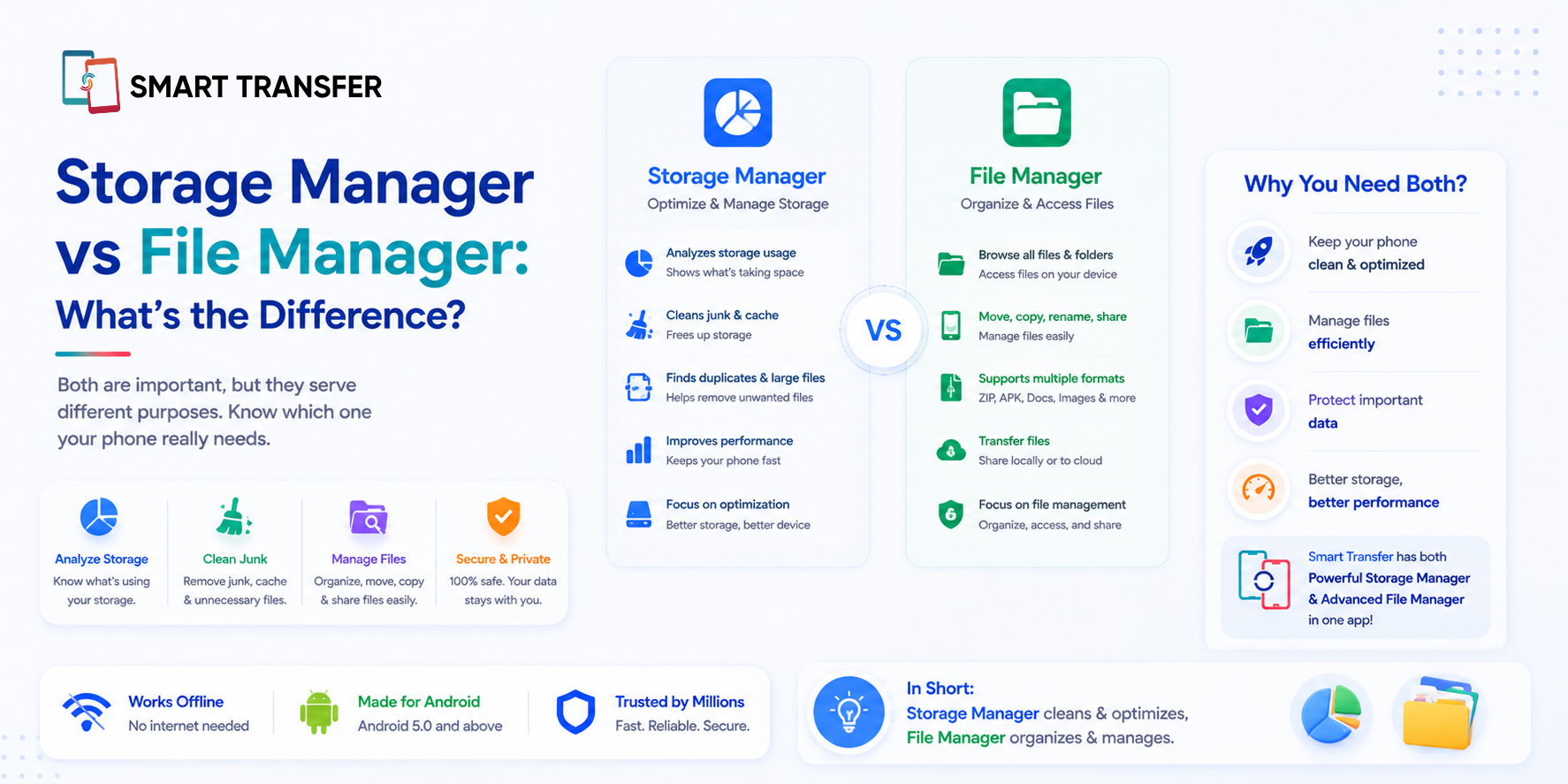
A Storage Manager helps you understand what's taking up space on your phone and identify files you may no longer need, while a File Manager helps you browse, organize, move, and manage individual files and folders. Although the two tools sound similar, they solve different problems.
For example, if your phone is running out of space and you have no idea what's causing it, a Storage Manager can give you a clearer picture of your storage. If you already know which document, photo, or download you want to find, move, rename, or delete, a File Manager gives you more direct control.
In this guide, we'll break down the difference between a Storage Manager and File Manager, explain when to use each, and help you decide which tool is right for the task. If your main goal is to find unnecessary clutter and free up space, you can also explore Smart Transfer's Storage Manager for a clearer way to review what's taking up room on your device.
Key Takeaways
A Storage Manager and File Manager serve different purposes. A Storage Manager helps you understand what is using your phone's storage and identify files or clutter you may want to remove, while a File Manager gives you direct control over individual files and folders.
Use a Storage Manager when you need to free up space. It can help you review storage usage and find large files or unnecessary clutter without manually searching through every folder. Smart Transfer's Storage Manager can help you get a clearer view of what's taking up space.
Use a File Manager when you know what you want to manage. It's the better tool for finding, moving, renaming, copying, or deleting specific files and organizing folders on your device.
Storage Manager vs File Manager: The Key Differences
The main difference between a Storage Manager and a File Manager is simple: a Storage Manager helps you understand and manage how your phone's storage is being used, while a File Manager helps you work directly with individual files and folders.
Both tools can be useful, but the right choice depends on what you're trying to do.
If you're asking, "What's taking up all my phone storage?", a Storage Manager is usually the better place to start. It gives you a broader view of your storage and helps you identify areas worth reviewing.
If you already know exactly what you're looking for, such as a downloaded document or a folder you want to reorganize, a File Manager gives you more direct control. In many cases, the two tools work well together: one helps you understand where your storage is going, while the other helps you manage individual files and folders.
What Is a Storage Manager?
A Storage Manager is a tool that helps you understand how your phone's storage is being used and identify files that may be taking up unnecessary space. Instead of manually opening folders one by one, you can get a broader view of what is using your storage.
Depending on the tool, a Storage Manager may help you identify large files, duplicate content, temporary files, old downloads, and other clutter worth reviewing. This makes it particularly useful when your phone is running low on space and you're not sure where to start.
Unlike a File Manager, a Storage Manager is focused less on moving or renaming individual files and more on helping you make informed decisions about what may be worth cleaning up. If you're trying to identify and clear unnecessary clutter, you may also find our guide on the best ways to remove junk files from Android helpful.
The goal is not to delete files blindly. A good Storage Manager gives you a clearer picture of what is using space so you can review your options before removing anything important.
What Is a File Manager?
A File Manager is a tool that lets you browse, organize, and manage the files and folders stored on your phone. It gives you direct access to content such as documents, downloads, images, videos, and other files.
With a File Manager, you can usually move files between folders, rename them, copy them, or delete specific items you no longer need. This makes it useful when you already know what you're looking for and want direct control over where your files are stored.
Unlike a Storage Manager, a File Manager does not primarily focus on helping you understand why your storage is full. You may need to manually browse folders or sort files by size to identify what is taking up space.
If you need to move files from one device to another rather than simply organize them on your phone, you can also use Smart Transfer to share files between devices.
In short, a File Manager helps you work with individual files, while a Storage Manager helps you understand and manage the storage those files use.
When Should You Use a Storage Manager?
You should use a Storage Manager when you need a clearer picture of what is taking up space on your phone. It is especially useful when your storage is running low, but you do not know which files, apps, or categories are responsible.
A Storage Manager can help you identify large files, duplicate content, old downloads, and other unnecessary clutter worth reviewing. Instead of searching through folders one by one, you can start with the areas using the most storage.
This makes it a useful option when you want to free up space without deleting important files blindly. If that is your main goal, our guide on how to free up phone storage without deleting important files can help you clean up your device more safely.
In short, use a Storage Manager when the problem is "My phone storage is full, but I don't know why."
When Should You Use a File Manager?
You should use a File Manager when you know which files or folders you want to work with. It is the better choice for tasks such as finding a specific document, moving photos into another folder, renaming files, or organizing downloaded content.
For example, if you need to locate a PDF you downloaded last week or move a group of files into a different folder, a File Manager gives you direct control over those individual items. You can browse your device, open folders, and manage files based on what you need.
A File Manager can also help when you want to manually organize content before transferring it to another device. If you are switching phones and need to move more than just individual files, Smart Transfer's Clone feature can help transfer supported data from one device to another.
In short, use a File Manager when the task is "I know what I need to manage and where I want it to go."
Can You Use a Storage Manager and File Manager Together?
Yes. A Storage Manager and File Manager can work together because they solve different parts of the same problem. A Storage Manager helps you understand what is using your phone's space, while a File Manager gives you more direct control over individual files and folders.
For example, you might use a Storage Manager to identify a folder containing large or unnecessary files. Once you know where the storage is going, you can use a File Manager to browse those files, organize them, move them, or delete the ones you no longer need.
You can also take steps to protect important files before making major changes to your storage. Smart Transfer's Backup & Restore feature can help you back up supported data, giving you an extra layer of confidence before removing files you may no longer need.
Think of it this way: a Storage Manager helps you find the storage problem, while a File Manager helps you work directly with the files involved. Using both can give you a clearer view of your device and more control over how you manage its storage.
How Smart Transfer Helps You Manage Phone Storage
If your main concern is understanding what is taking up space, Smart Transfer brings storage management into the same app you can use for other everyday phone tasks. Its Phone Cleaner and Storage Manager helps you review your device storage and identify unnecessary clutter without manually opening every folder.
This can be particularly useful when your phone is running low on space and you are unsure where to begin. Instead of immediately deleting photos, videos, or documents, you can first review what is using your storage and make more informed decisions about what you no longer need.
The goal is not to replace a File Manager. The two tools serve different purposes. A File Manager gives you hands-on control over individual files and folders, while Smart Transfer's Storage Manager helps you get a broader view of your storage and spot areas that may need attention.
If you want a simple way to remember the difference, think of it like this: a Storage Manager helps you decide what to clean, while a File Manager helps you manage individual files.
Choose the Right Tool for the Job
A Storage Manager and a File Manager serve different purposes, but both can make managing your phone easier. If you are trying to figure out what is taking up all your storage, a Storage Manager can help you identify where your space is going and spot files or clutter worth reviewing. If you already know which file you need to find, move, rename, or organize, a File Manager gives you direct control over it.
Smart Transfer's Storage Manager can help you get a clearer view of your device and make more informed decisions about what to clean up, without blindly deleting files that may still matter. Ready to take better control of your phone's storage? Download Smart Transfer today from Google Play or the Apple App Store and start managing your space with more confidence.
Frequently Asked Questions About Storage Managers and File Managers
Is a Storage Manager the same as a File Manager?
No. A Storage Manager focuses on showing how your phone's storage is being used and helping you identify files or clutter that may be taking up unnecessary space. A File Manager focuses on browsing, organizing, moving, renaming, and managing individual files and folders.
Do I need both a Storage Manager and a File Manager?
Not necessarily. The right tool depends on what you need to do. Use a Storage Manager when you want to understand what is taking up space. Use a File Manager when you need to work with a specific file or folder.
Which is better for freeing up phone storage?
A Storage Manager is generally the better choice for freeing up phone storage because it helps you identify where your space is being used. A File Manager can still help, but you may need to manually search through folders to find files you no longer need.
Can a File Manager help remove junk files?
Yes, but usually through manual cleanup. You can use a File Manager to browse folders and delete old downloads, duplicate files, or other content you no longer need. A Storage Manager can make this process easier by helping you identify areas worth reviewing first.
What does a Storage Manager do on Android?
A Storage Manager helps you review how your Android phone's storage is being used. Depending on the tool, it can help identify large files, duplicate content, temporary files, old downloads, and other unnecessary clutter.
Is it safe to use a Storage Manager?
Yes, as long as you review what is being removed. A Storage Manager should help you identify files worth cleaning rather than encouraging you to delete everything automatically. Always check important photos, documents, backups, and other files before removing them.