You charge your phone to 100 percent, unplug it, and feel set for the day. For a while, everything seems fine. You check messages, scroll a bit, maybe watch a short video. Nothing unusual.
Then you glance at your battery again, and it is already dropping faster than expected. By mid-day, it is lower than it should be, even though your usage feels normal.
That is what makes battery drain frustrating. It does not feel connected to what you are doing. It feels unpredictable.
But it is not. Battery drain follows patterns. The problem is that most of those patterns happen in the background, where you do not see them. Once you understand what is actually consuming power, the behavior starts to make sense, and more importantly, it becomes fixable.
Key Takeaways
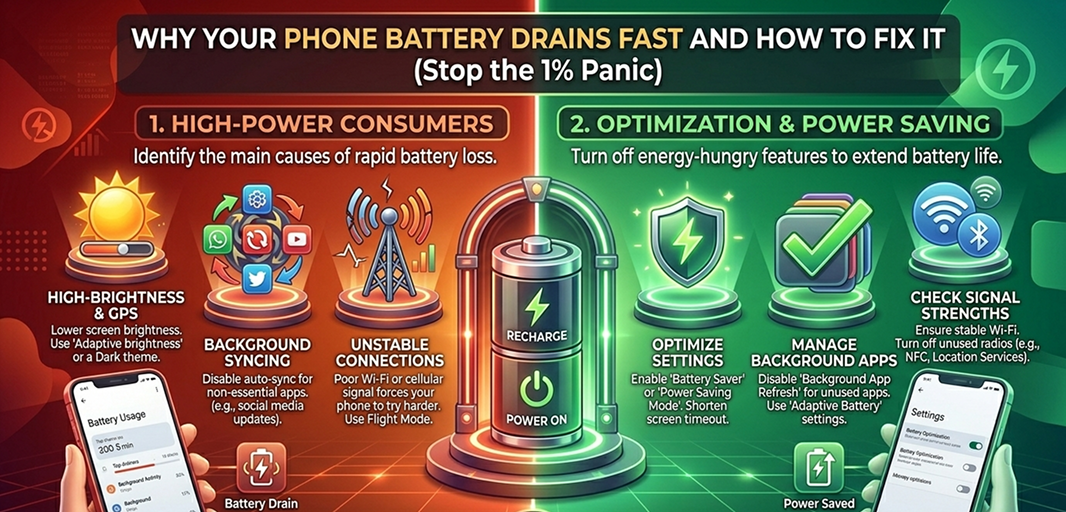
Battery drain is predictable. It usually comes from apps, screen usage, network issues, or background processes.
Background activity and weak signals drain power even when you are not actively using your phone.
Your screen is the biggest battery consumer. Small changes in brightness and usage make a big difference.
Fix the cause, not the symptom. Identify what is draining power instead of applying random tips.
The Real Reason Your Battery Drains Fast
Your phone is not running one task at a time. It is running dozens of processes simultaneously. Some are visible, like the apps you open. Others run quietly in the background, constantly updating, syncing, and maintaining connections.
When your battery drains quickly, it is usually because one or more of these systems are working harder than they should.
In most cases, the drain comes from:
Background apps running continuously
Screen usage and brightness levels
Network activity, especially weak signals
System processes like syncing and updates
You do not need to control everything. You just need to identify which of these is overactive. That is where the real fix comes from.
Background Apps Are Quietly Draining Power
Closing an app does not always stop it. Many apps continue running in the background, refreshing content, checking for updates, and syncing data.
This is useful for things like messages or email, but it becomes inefficient when too many apps are doing it at the same time.
Think about how many apps on your phone:
Check for updates regularly
Send notifications throughout the day
Sync data even when you are not using them
Each one uses a small amount of power. Together, they create constant activity.
You will notice this when:
Your battery drops even when the phone is idle
You receive frequent updates from multiple apps
Your phone feels slightly warm without heavy use
To reduce this:
Restrict background activity for apps you rarely use
Remove apps you no longer need
Check battery usage settings to identify high-consumption apps
The goal is not to shut everything down. It is to remove unnecessary activity that keeps running without your awareness.
Your Screen Is the Biggest Power Consumer
If there is one factor that consistently drains battery faster than anything else, it is your screen.
Brightness, screen-on time, and display settings all directly affect how much power your phone uses. Unlike background processes, this is something you control every time you use your device.
For example, using your phone at high brightness outdoors, keeping the screen on while reading, or using a high refresh rate display all increase power consumption significantly.
You may notice faster drain when:
Your brightness stays near maximum
Your screen remains on longer than needed
You frequently watch videos or scroll for long periods
To reduce this:
Lower your brightness or enable auto brightness
Reduce screen timeout so it turns off sooner
Disable features you do not actively notice, like high refresh rates
These are small adjustments, but they produce immediate results because the screen is such a major power consumer.
Weak Network Signals Drain Battery Faster
This is one of the most overlooked causes of battery drain.
When your phone struggles to maintain a signal, it increases its power usage to stay connected. It keeps searching, reconnecting, and switching between available networks.
This often happens in places like:
Buildings with poor reception
Areas with unstable mobile coverage
Locations where Wi-Fi and mobile data overlap weakly
You may notice that your battery drains faster even when you are not actively using your phone in these situations.
To reduce this drain:
Connect to a stable Wi-Fi network when possible
Turn off Wi-Fi or mobile data when not in use
Avoid constant switching between networks
A stable connection reduces the effort your phone needs to stay online.
Too Many Notifications and Syncing
Every notification is the result of a background process. Apps constantly check for updates, pull new data, and send alerts.
Individually, this seems harmless. Collectively, it creates continuous activity that drains battery throughout the day.
You might notice:
Frequent notifications from apps you barely use
Constant background refresh in your settings
Battery usage that does not match your visible activity
To reduce this:
Turn off notifications for non-essential apps
Limit auto-sync to only what you need
Keep only important apps active in the background
This reduces constant interruptions and unnecessary processing.
Battery Aging and System Updates
Not all battery drain is caused by settings. Sometimes, the battery itself is the issue.
Over time, batteries lose their ability to hold a charge. This is normal. If your phone is older, it will not last as long as it did when it was new, even under the same usage.
System updates can also temporarily affect battery life. After an update, your phone may run background processes to optimize performance, which increases usage for a short period.
You can check:
Battery health in your device settings
Whether your system or apps need updates
If your battery health is significantly reduced, replacing it is the only long-term solution.
Hidden Drains Most People Miss
Some features quietly run in the background without drawing attention, but they still use power consistently.
These include:
Location services running continuously
Widgets updating information in real time
Live wallpapers or animations
Individually, these do not seem significant. Together, they create a steady drain.
You can reduce this by:
Limiting location access to essential apps
Removing widgets you do not actively use
Switching to a static wallpaper
These are low-effort changes that remove constant background load.
If Your Battery Still Drains Fast
If you have made these adjustments and the problem continues, you need to test the system more directly.
Instead of guessing, check:
Battery usage statistics to identify specific apps
Whether a recent app installation triggered the issue
If restarting the device improves performance
You can also try resetting settings if something is misconfigured. If none of this works, the issue may be hardware-related.
How to Prevent Battery Drain Going Forward
Once your battery performance improves, maintaining it becomes easier.
You do not need to control every setting. Focus on consistency:
Keep background activity limited
Manage screen brightness and usage
Stay connected to stable networks
Keep your system updated
These habits reduce unnecessary power usage over time without requiring constant attention.
A Smarter Way to Keep Your Phone Running Efficiently
Battery performance is closely tied to how efficiently your phone runs overall. When your device is cluttered with unnecessary files or overloaded with data, it works harder, which increases power consumption.
With Smart Transfer, you can:
Clean up duplicate and unnecessary files
Manage storage more effectively
Keep your device running smoothly
A more efficient phone uses less power. That directly supports better battery performance without needing constant adjustments.
Final Thought
Battery drain is not random. It is the result of how your phone is being used and how its systems interact in the background.
Once you identify what is consuming power, the solution becomes clear. You stop applying random fixes and start making targeted changes.
If your battery keeps draining faster than expected, do not assume it is normal. There is always a reason. And if you want to keep your phone running efficiently over time, take control of what is happening behind the scenes. Download Smart Transfer App now and keep your device optimized, organized, and running at its best.